How to Remove a Fake Google Review
Twenty-six of the 402 businesses in our regional audit are rated under 4.0. Nearly every owner in that group is convinced at least one of the reviews dragging him down is fake. A few of them are right.
The trouble is that Google does not remove reviews for being false. It removes reviews for breaking a specific written policy, which is a much narrower door. “This never happened” is not one of the categories.
That distinction is worth money. Businesses in our audit rated between 4.0 and 4.4 made the map pack 7% of the time, against 37% for the 4.8-and-up group. One review can sit on that line.
Here is how to tell whether yours is actually removable, the exact path to file it, and what to do about the ones that are not going anywhere.
What Google will actually remove
Google’s review policies name the violations. A report that points at one of them has a chance. A report that says “this is unfair” does not.
The categories that matter for a contractor:
- Fake engagement. A review from someone who was never a customer, or a batch of reviews placed to move a rating.
- Conflict of interest. A review from a competitor, a former employee, or anybody with a stake in your business looking worse.
- Off topic. A rant about a political sign on your truck. A complaint about the company that used to have your phone number.
- Personal information. A review that publishes a home address, a phone number, or an employee’s full name in an accusation.
- Harassment or hate speech. Slurs, threats, repeated posts targeting one person.
- Impersonation. A review posted under a fake identity pretending to be a specific real person.
Notice what is not on that list. A customer who is wrong about the facts. A customer who is angry about a price you quoted correctly. A customer whose expectations were never reasonable. Those stay, and the way you handle them is a short written response, not a report.
Before anything else, read the review engine post for what your review profile is actually doing for you. Most of the time the fake review is not the problem. The 22 reviews you never collected are.
How to tell a fake from a bad one
Five checks, in the order we run them. Do these before you file anything, because a report with evidence behind it survives longer than one without.
Tap the reviewer’s name. Google shows every review that profile has left. A profile with one review, ever, and it is your one star, is the strongest single signal there is. A profile leaving five-star reviews to three of your competitors in the same week is the second strongest.
Check the geography. A reviewer whose other reviews are all restaurants in Arizona did not have your crew in her basement in Palmerton.
Check the clock. Three or four bad reviews inside 48 hours, after a quiet year, is a pattern and not a coincidence. Screenshot the timestamps before they age out of view.
Check the detail. Real complaints carry specifics: a date, a part, a price, a name. Fakes are generic because the writer does not know anything. “Terrible service, would not recommend” with no detail, from a one-review profile, is about as clear as this gets.
Then check your own records. Search the name, the address, and the phone number in your job software going back three years. In Monroe County this matters more than people think, because a short-term rental owner in Brodheadsville will sometimes review the contractor her property manager hired rather than the one she thinks she is reviewing.
If the review survives all five checks, it is probably a real customer having a bad day. Respond to it and move on.
The path, step by step
1. Document it first
Screenshot the review, the reviewer’s profile page, and their other reviews. Save the date. Google removes profiles sometimes, and the evidence disappears with them.
Done when: you have three images in a folder with the date in the filename.
2. Flag it
Open the review in your Google Business Profile or in Google Maps, hit the three dots, and choose to report it. Pick the category from the list above that fits best. Pick one. Reporting the same review under four categories does not help and can look like spam.
Done when: you have the confirmation screen, screenshotted.
3. Use the review management tool
Google runs a separate tool where you can see the status of reviews you have reported and appeal a decision. Search for “Google Review Management Tool” and sign in with the account that manages the listing. This is where most owners stop, and it is the step that does the most.
Done when: the review shows a status rather than nothing.
4. Appeal once, with your evidence
If the report is rejected, appeal it in that same tool. Write two sentences, not two paragraphs. Name the policy and give the evidence: “This reviewer’s profile shows a single review, posted the day after we declined to subcontract for a competitor. Reporting under conflict of interest.”
Done when: the appeal is filed. Then leave it alone.
5. Escalate only if there is a pattern
For a coordinated run of reviews, Google Business Profile support and the Business Profile Help Community forum are worth the hour. Bring the log. A single review is not worth escalating and you will not get traction on it.
How long it takes and how often it works
A few days to a few weeks for a decision, in what we have seen. Sometimes nothing comes back at all and the review just quietly disappears a month later.
I am not going to give you a success rate, because we have not counted ours properly and every number you will see published on this is somebody’s marketing. What I can tell you is the shape of it: reviews that clearly break a named policy come down at a decent clip, and reviews that are merely unfair almost never do. Plan around the second case.
What not to do
Do not pay anyone who guarantees removal. Nobody has a line to Google, and the ones selling this frequently do it by mass-reporting, which can get your own listing flagged.
Do not accuse the reviewer publicly. “This person is a competitor and everyone knows it” reads terribly to the next homeowner, who has no context and sees only a business fighting on its own listing.
Do not answer fake negatives with fake positives. Reviews from your cousin and your two employees are the same policy violation you are reporting, and Google is better at spotting clusters from one IP than most owners assume. Losing 30 reviews at once, which happens, would put you further back than the fake ever did.
When to stop fighting it and bury it instead
Here is the part nobody selling reputation management will tell you. Most of the time the cheaper fix is arithmetic.
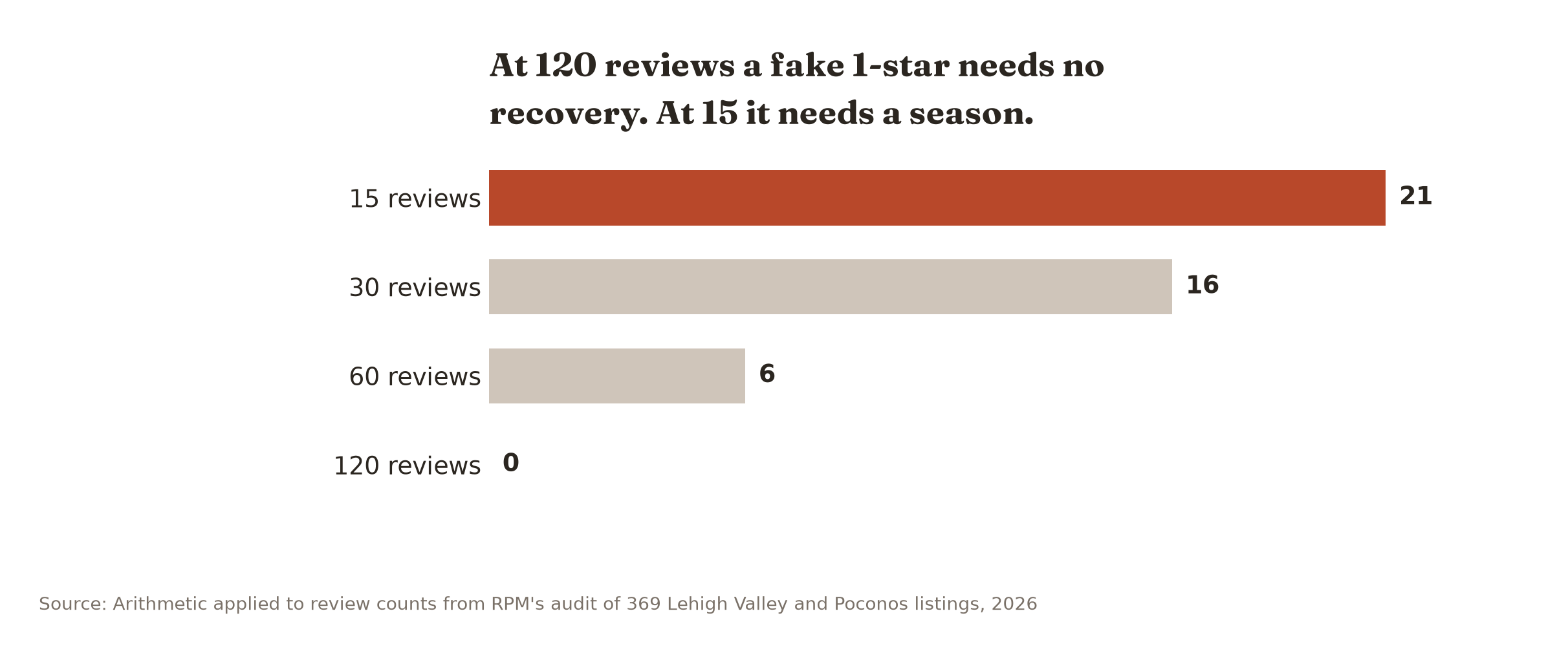
If you already have 120 reviews, a single fake one-star does not take you below 4.85 at all and there is nothing to recover. At 60 reviews it is six good ones, which is two weeks of asking. At 15 reviews it is 21, which is most of a season, and that is the group that actually needs to file the report.
So the decision is simple. Under 30 reviews, fight it and collect at the same time. Over 100, file the report in ten minutes and then forget about it, because your time is worth more on the collecting side.
The collecting side is two posts: the texts that get answered and how to make the ask without it being weird.
The competitor case, and the small-town version of it
Coordinated attacks are real and they are not common. In four years around here we have seen a handful, usually after a bid went badly or somebody left the company on bad terms.
In Allentown, with 83 businesses in our audit competing across the same few terms, an attack is hard to trace to anyone. In Jim Thorpe or Lehighton, where the map pack leaders sit on 33 reviews and everybody in the trade knows everybody, it usually is not. Owners in those towns generally know exactly who did it, which is useful for the appeal and unhelpful for everything else.
Keep a log either way: date, reviewer name, screenshot, what happened in the business that week. Two incidents with a log is a case. Two incidents from memory is a story.
What to do next
Pull up the worst review on your listing tonight and run the five checks. Ten minutes. Either you have a reportable policy violation, in which case file it before you go to bed, or you have an unhappy customer and a response to write.
What you cannot check yourself is the thing underneath it: whether that review is genuinely costing you position, or whether you would be invisible in half your service area at 5.0 anyway.
Our Local Visibility Scan answers that, free. A map-pack grid across the Lehigh Valley and the Poconos, your rating and review count against your top three competitors in each town, site speed, and the biggest leak we can find. One page, without a call, and we never pass your information along. If you want every review read and sorted, plus what your competitors’ reviews say about them, that is the $399 Strategy Session. The report is yours either way.