GA4 for Local Businesses: The Four Numbers That Matter
A roofing company in Easton asked me to look at his analytics last year. He had 140 pages of reports from a previous agency and could not answer the only question he had, which was whether the money he spent in the fall produced anything in the spring.
GA4 will do that. It will also drown you, which is why most owners log in twice, see eleven menus and a sidebar of things called explorations, and never go back.
There are four numbers in there worth your time. Everything else is for analysts. Knowing those four tells you whether your site is producing work, where the people came from, which pages did the producing, and whether any of them live in towns you actually serve. They are the website half of figuring out which marketing produced the job.
Here is how to find each one and what it should say.
First, make sure it is counting anything
GA4 out of the box counts page views. It does not count the things that matter unless somebody tells it to, and on most contractor sites nobody did.
The two events you need are a click on your phone number and a form submission. In GA4 those become key events, which is the setting that used to be called a conversion. Your web person can do it in about twenty minutes, or GA4’s own enhanced measurement will catch some of it automatically if the links are built properly.
That last clause is doing a lot of work. In our audit of 402 home services companies across the Lehigh Valley and the Poconos, plenty of sites had links that will never fire an event. A heating company in Brodheadsville with 188 reviews has header, hero and footer location links built as javascript:void(0), which go nowhere when clicked. One Nazareth HVAC company serves an error message where its contact form should be. Analytics on either of those sites will faithfully report zero conversions, and it will be correct.
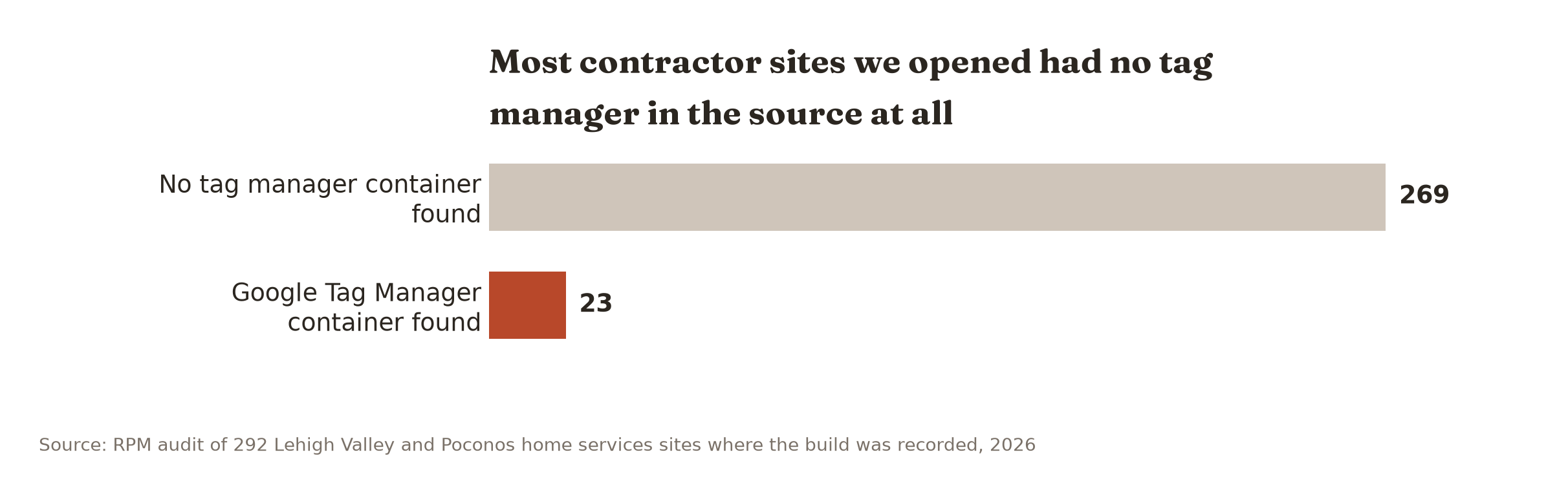
Two structural things will also blind you. If your quote form lives on somebody else’s domain, which we found on an HVAC company near Emmaus and an Allentown electrician, the submission happens where your analytics cannot see it. And if your site source has no tag manager container at all, the whole exercise is theoretical. We recorded the build on 292 of those sites. Twenty-three showed a Google Tag Manager container.
Check yours first. Right-click your homepage, choose view page source, and search the text for “gtag” or “GTM-“. If neither is there, nothing below applies to you yet.
Then check the phone number the same way. A click-to-call event can only fire if the number on the page is a real link, built as tel: followed by the digits. On a lot of template builds it is an image, or plain text, or a raw string that prints the link target on the page as visible words. We found all three across the audit. Open your site on your phone and tap the number. If nothing happens, your analytics will never see a single call, no matter how the tracking is configured.
Start with key events
Where: Reports, then Engagement, then Events. Or the Key events line on the Reports snapshot.
This is the count of phone taps and form submissions. It is the closest thing GA4 has to “did the site produce work,” and it is the only number on this list you should look at every month without fail.
What good looks like depends entirely on your traffic. A Nazareth plumbing site getting 400 visits a month should be producing somewhere north of twenty key events. If it is producing three, the problem is not traffic and buying more of it will not help.
A tap is not a job. Some of those people hung up, some were vendors, some were your own crew checking the site. The call log settles that, which is why this number belongs next to your call tracking report rather than on its own.
What to do with it: write the monthly number on the same sheet as your spend. That is it for month one.
Where they came from
Where: Reports, Acquisition, Traffic acquisition. Look at the column called Session default channel group.
This splits your visits into Organic Search, Direct, Paid Search, Referral, Organic Social and a few others. For a local contractor, two lines carry the story.
Organic Search is people who found you on Google without an ad. That number going up over a season is the clearest evidence that local SEO work is doing something.
Direct is people who typed your name, used a bookmark, or arrived from a link nothing could track. On contractor sites this bucket is inflated, because it catches the truck-wrap traffic, the yard-sign traffic, and anything from a text message. If Direct is half your traffic, that is not a mystery to solve. That is your offline marketing showing up, and the way to separate it is tagged links, not a better analytics setup.
What to do with it: compare this month’s Organic Search sessions to the same month last year. Not to last month. Heating traffic in January and AC traffic in July are different businesses.
The page they land on is the page to fix
Where: Reports, Engagement, Landing page.
This tells you which page people arrive on, and it is the most actionable report in GA4 for a local business. Sort it by key events instead of by sessions. Now you are looking at the pages that actually produce calls.
What you usually find surprises owners. It is rarely the homepage. It is a service page, or a town page, or one old blog post about a specific problem. A Stroudsburg remodeler we looked at gets most of his form fills from a single bathroom page, not from the front door of the site.
Once you know which two pages produce, the work becomes obvious. Put the phone number higher on them. Add photos of jobs you did in the towns those visitors come from. Write the next page in the same shape as the one that already works.
What to do with it: name your top two producing pages out loud. If you cannot, you have not opened this report yet.
Then the towns
Where: Reports, User, User attributes, then Demographic details. Change the top dropdown from Country to City.
This is the number most agencies skip and the one a local owner cares about most, because your business is not national and neither is your problem.
The list will show you Allentown, Bethlehem, Easton, Stroudsburg, and a long tail of places you do and do not serve. Read it against your actual service area. A Palmerton contractor pulling most of his traffic from Allentown has a coverage problem that no amount of homepage tweaking will fix. A Lehighton company with nothing from Jim Thorpe, fifteen minutes away, has a town page missing.
Be careful with the small numbers. GA4’s city data comes from IP address and it is approximate. Somebody on a phone in Palmerton can show up as Allentown because of how their carrier routes traffic. Read the shape of the list, not any single row.
What to do with it: circle the three towns you want work from that are not in your top ten. Those are your next three pages.
What to ignore
Users, sessions, average engagement time, realtime, and every report with the word “exploration” in it.
Not because they are worthless. Because they will absorb an hour and change nothing about your Monday. An owner who checks realtime traffic is watching a stock ticker for a stock he cannot sell.
Bounce rate deserves a specific mention, since somebody has probably quoted it at you. GA4 defines it as the inverse of engagement rate, which means it moved from its old meaning and is not comparable to whatever number an agency showed you in 2019. Ignore it.
What GA4 will not tell you
It will never match your call log, and you should stop trying to make it.
Ad blockers, browser privacy settings and cookie consent banners all remove visitors from the count. The gap is real and it is not small. Your analytics undercounts, your call log is closer to the truth, and the useful thing GA4 gives you is direction and proportion, not a headcount.
It also cannot see your Google Business Profile. Calls and direction requests from your listing happen inside Google and never touch your website, so they appear nowhere in these four reports. That traffic is often the majority of a local contractor’s leads. Read the profile’s own performance report alongside this, or you are grading yourself on half the exam.
And it cannot tell you whether a visitor became a job. Only your invoice can do that, which is why the whole tracking system ends at the job record in Jobber or ServiceTitan rather than in an analytics dashboard.
Ten minutes a month, on the first
Open GA4 on the first of the month. Write down four figures: key events, organic sessions, your top producing landing page, and your top three cities. Put them in the same notebook as your spend.
By the third month you will have a shape. By the sixth you will catch a drop the week it happens instead of the quarter after, and catching a drop early is most of what analytics is worth to a business this size.
If you do not want to do this at all, that is a defensible decision. A contractor with one marketing channel and a full schedule can get by on the call log and the Google listing report alone. What is not defensible is paying somebody for monthly reports you do not read.
What to do next
You can check your own page source for a tag in two minutes, and you can open those four reports in ten. Do that this week and you will know more about your site than most of your competitors know about theirs.
What GA4 will not show you is the part that happens before anyone reaches your site. Whether you appear in the map pack in Easton but not in Nazareth. How your review count compares to the three companies ranked above you. How fast your site loads on a phone with one bar off Route 33.
Our free Local Visibility Scan covers that. Your position in each town, the review counts of whoever is above you, a real load time, and the single biggest leak we can find. One page, no meeting required, and your information goes nowhere else.
If you want the full read, including what your analytics and call data are actually saying together, that is the $399 Strategy Session, and you keep the report either way. Get your free Visibility Scan.