How to Know Which Marketing Actually Produced the Job
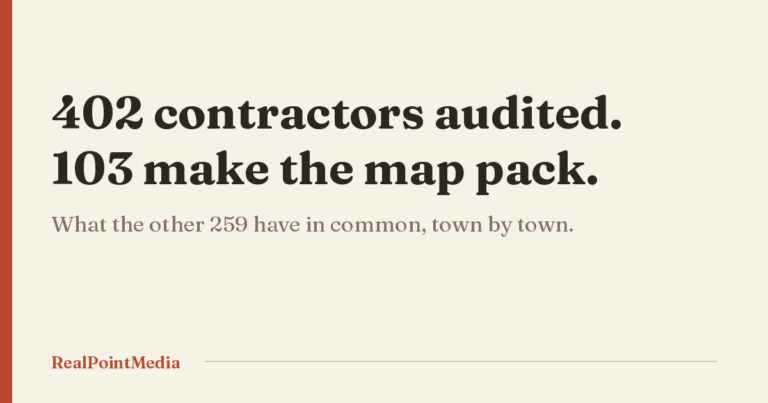
We audited 402 home services companies across the Lehigh Valley and the Poconos this year. One of them is a plumbing company in East Stroudsburg with 191 Google reviews and a perfect 5.0. Its contact page shows a visitor the word “Contact” and nothing else. No phone number, no form, no address.
That company is spending money on marketing somewhere. It cannot possibly know what any of it produced, because the place where the answer would appear is blank.
Most owners are one step better off than that and still guessing. They know the phone rang. They do not know whether it rang because of the Google listing, the truck wrap, the postcard, or the Facebook post from January. So the budget gets set by feel, and the thing that actually works gets cut in a slow month.
Here is how to build a record that tells you which marketing produced the job. It takes an afternoon to set up and about ten minutes a month to keep.
What guessing costs you
Say you spend $2,000 a month across ads, a directory listing, and a mailer. Half of that is producing work and half is not. Without a record, you cannot tell which half, so you keep paying both. That is $12,000 a year on the wrong half, and it compounds, because the good half never gets more money.
The other cost is worse and harder to see. When you cannot prove what works, you cannot say no to the next salesperson who calls. Every pitch sounds equally plausible. Owners who have been sold SEO twice and burned twice usually stop buying anything, which is its own kind of expensive.
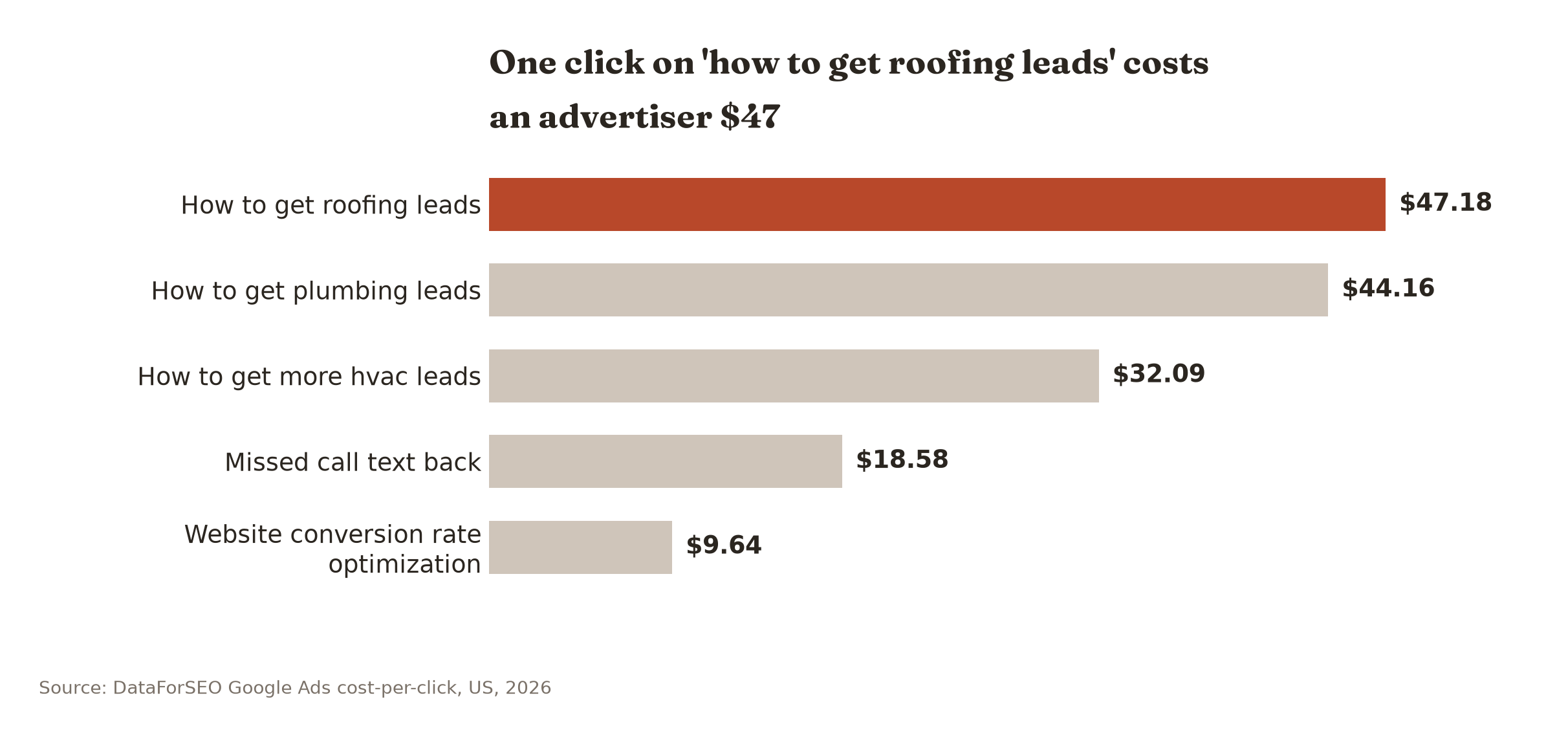
The clicks are not cheap either. Google Ads advertisers pay $47.18 for one click on “how to get roofing leads” and $44.16 on “how to get plumbing leads” (DataForSEO, 2026). Those are the people bidding for your attention as a buyer. The terms your customers use cost real money too. If you are buying anything in that neighborhood, you want to know what came back.
Every job arrives one of five ways
Before you buy any software, write down how work actually gets to you. For a home services company in this region it is almost always one of five routes, and each one needs a different kind of proof.
| How the job arrives | What you need to capture | How you prove the source |
|---|---|---|
| Phone call to the office | Which number they dialed | A separate tracking number per channel |
| Phone call from the Google listing | That it came from the listing | Google Business Profile’s own call report |
| Form on your website | The page and the traffic source | A hidden source field on the form |
| Text or online booking | Which link they tapped | Tagged links, one per channel |
| Referral or repeat customer | Who sent them | The question your office manager asks |
Five routes. Five different proofs. Nobody gets all five right on the first try, and you do not need to. Get the first three and you have covered most of the money.
Give each channel its own phone number
This is the single highest-value thing on the list, because in the trades most jobs still arrive by voice. A homeowner with water on the basement floor does not fill in a form.
The idea is simple. Your ads use one number. Your truck wraps and yard signs use another. Your website swaps in a third when the visitor came from Google. All of them ring your same office line. The software records which one was dialed, so the call log becomes a source report on its own. Call tracking for contractors covers the setup in detail, including the one mistake that can hurt your map ranking if you do it carelessly.
Two local notes that change the setup. If your service area crosses from Northampton County into Monroe County, buy tracking numbers in both area codes. A Brodheadsville homeowner reads a 610 number as “out of the area” and a Nazareth homeowner reads 570 the same way. It is a small thing that shows up in answer rates.
And leave the number on your Google Business Profile alone. Google already reports how many calls that listing produced. Use its report for the listing and save the tracking numbers for everything else.
Make the form say where it came from
Every form on your site should quietly record two things the visitor never sees: the page they were on, and where they came from before they landed.
Any competent form plugin does this with a hidden field. The value lands in the email you get and in the spreadsheet behind it. Then a form submission reads “Kitchen remodel, /bathroom-remodeling-stroudsburg/, google organic” instead of just a name and a phone number.
Two warnings from the audit. In our set of 402, fourteen businesses had a contact path that visibly failed in a browser. One Nazareth heating company’s contact form returns an error message where the form should be. A remodeler in Jim Thorpe has a footer email link that renders as a reversed, scrambled string, so anything sent from that link goes nowhere. Neither owner knows, because a form that never submits generates no complaint.
The second warning is subtler. Two companies in our audit, an HVAC contractor near Emmaus with 191 reviews and an Allentown electrician with 147, both hand their quote requests off to a Wufoo form hosted on somebody else’s domain. The lead still arrives. The trail does not. Once the visitor leaves your site, your analytics stops watching, and you lose the ability to tie that job back to the page that earned it. If you are going to use an outside form, embed it on your own page instead of linking out to it.
Tag the links, not just the forms
Anywhere you put a link to your own site, you can staple a label onto the end of it. A homeowner never sees the label. Your analytics does.
The format is ugly and you only have to write it once per channel. Your Facebook page link becomes yoursite.com/?utm_source=facebook. The link in your email footer becomes yoursite.com/?utm_source=email. The QR code on the spring mailer becomes yoursite.com/?utm_source=mailer-march.
Save them in a note on your phone. Every time you hand a link to anybody, hand the tagged one. That is the entire discipline, and it is the difference between a report that says “Direct traffic, 340 visits” and one that tells you the mailer worked.
The place this matters most around here is the seasonal push. If you send a postcard to 2,000 households in Lehighton for AC tune-ups and the only route back is your main phone number, the mailer and the Google listing look identical in your records. Tag the link, put a tracking number on the card, and by the middle of May you will know whether to send it again next spring or stop.
The intake question, asked correctly
Software will get you most of the way. The last stretch is a human one.
“How did you hear about us?” is the wrong question. People answer it with whatever comes to mind, and the honest answer is usually “I don’t remember.” One Allentown plumbing company in our audit still offers Verizon Yellow Pages, Yellow Book and Google+ as options on its own form. That tells you how long it has been since anyone read the answers.
Ask this instead, on every call: “Did you find us on Google, or did somebody give you our name?”
Two choices. People can answer it. If they say somebody gave the name, the follow-up is “who was that,” and now you have a referral source worth a Christmas card. If they say Google, the tracking number already told you which Google.
Write the question on a card and tape it to the monitor where calls get answered. That is the whole implementation.
The free report almost nobody opens
Your Google Business Profile keeps its own record of what the listing produced, and it costs nothing because you already own it.
Open the profile, find the performance section, and set the range to the last month. You get calls from the listing, direction requests, website clicks, messages, and the searches people used to find you. For a lot of contractors in this region that listing is the single largest source of work, and the report sits there unread for years.
Two things to know before you read too much into it. The call count includes people who tapped the button and hung up before it connected, so it runs high compared to your phone log. And direction requests are a good proxy for people who intend to show up but mean nothing at all for a company with no storefront, which is most of you.
Write down the monthly call count. That one figure, next to your ad spend and your form count, is most of a marketing report for a company this size.
Put the answer on the job, not the lead
This is where most attribution setups fall apart, and it is not a technical problem.
Marketing software counts leads. You do not sell leads. You sell jobs, at different sizes, at different margins. Thirty leads from a directory that turn into two $400 service calls are worth less than four leads from your own site that turn into one $14,000 system replacement.
So the source has to travel with the job all the way to the invoice. In Jobber, that is the lead source field on the client record. In ServiceTitan, it is the campaign field on the job. Both will report revenue by source once the field is actually filled in, and both will report nothing useful if your office manager leaves it blank because nobody told her it mattered.
Tell her it matters. Then check it once a week for a month until it sticks.
Two of the larger HVAC operations in our audit, one in Allentown and one in Stroudsburg, have ServiceTitan online booking wired straight into their Google listings. Whatever else you think of the national franchise model, those two know exactly what their listing produced last month. You can get to the same place on a much smaller budget.
One number, once a month
Once the source travels with the job, you only need one number per channel: cost per booked job.
Take what you spent on a channel last month. Divide it by the number of jobs that closed with that source attached. That is it. No dashboard, no report from an agency, no session metrics.
A roofing company in Easton might find that its ads cost $310 per booked job and the Google listing costs $22. That does not mean kill the ads. Roofing volume off a listing is capped by how many people search in a month, and after a hailstorm on the 33 corridor you will take every job you can buy. It means you now know what you are paying for the marginal job, which is the only thing that lets you decide sanely in a slow February.
Run the division in a notebook if you like. The arithmetic is not the hard part. Filling in the source field is the hard part.
What this will not tell you
I am not going to pretend this gives you a clean ledger. It does not, and any agency that says otherwise is selling you a dashboard.
Three things it genuinely cannot see. First, the customer who saw your truck on Route 22 in October, remembered the name in March, searched it, and called from the listing. Your record says “Google.” The truck did the work. There is no honest way to separate those, and anyone who claims to has built a model, not a measurement.
Second, word of mouth that routes through search. Somebody at a barbecue in Palmerton recommends you by name. That person Googles you. Same problem.
Third, the jobs you never hear about. If your form is broken or nobody answers after five, those calls are not in any report, because they are not in any system. Measurement tells you about the leads that arrived. It is silent about the ones that turned around at the door.
That last one is not a small category. In our audit, the single most common problem was not a broken form or a slow site. It was being absent from the map pack entirely, which means the homeowner never saw the business at all.
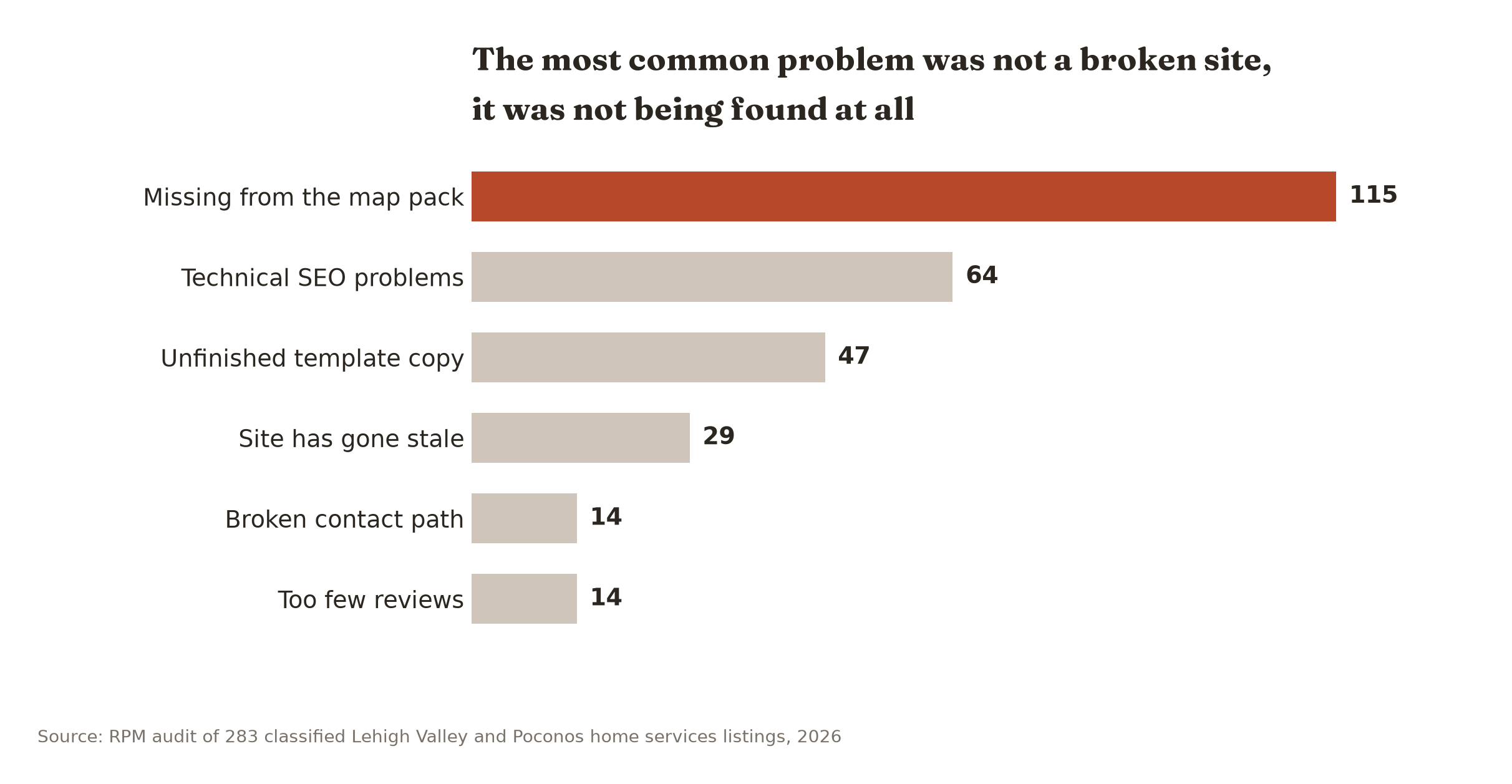
So measurement is the second job. If nobody can find you, there is nothing to attribute. The symptoms post covers how to tell whether that is your actual problem before you spend an afternoon on tracking numbers.
The setup, in order
- Write down your channels. Most companies this size have four or five. If you list twelve, you are counting things you have not spent money on since 2023.
- Buy one tracking number per channel, in the right area code for the county it advertises in. Point them all at your office line.
- Add the hidden source field to every form on the site. Test it by submitting one yourself and checking the email that arrives.
- Turn on Google Business Profile call reporting and write the monthly call count down somewhere you will see it again. The GA4 post covers the four website numbers worth the same treatment.
- Add the lead source field to your job software and make it required if the software lets you.
- Tape the intake question to the monitor.
- On the first of the month, divide spend by booked jobs per channel. Ten minutes.
Done when: you can pull up last month and say what each channel cost you per job, with a number, without calling anybody.
Three months is when it starts paying
The first month is garbage data. The field is blank half the time, somebody used the wrong number on a yard sign, and the office manager forgot the question twice a day. That is normal. Do not make decisions off it.
Month two is readable. Month three is when you can act, and the action is usually smaller than owners expect. It is rarely “cancel everything.” It is usually “the directory produces four service calls a month at $180 each and I pay $400 for it.” That is a phone call to cancel one line item.
Seasonality will lie to you for longer than that. A tracking setup started now, in the middle of March, will show heating calls falling and AC pre-season calls climbing, and neither of those has anything to do with your marketing. Give it a full year before you compare a month to the month beside it. Compare to the same month last year instead, once you have one.
And if you are about to spend real money on a new site, decide the tracking before the build, not after. Retrofitting source tracking onto a finished site is how you end up with an outside form on somebody else’s domain. What a website actually costs walks through what belongs in the build.
What to do next
You can set up the tracking numbers, the hidden form field, and the intake question yourself this week. All three are within reach of any owner with an afternoon and a little patience.
What is harder to see from your own desk is the other side of the equation: how much demand is out there that never reaches you at all. Where you rank across your service area town by town, what your competitors’ review counts look like next to yours, and which of your pages a homeowner actually lands on.
Our free Local Visibility Scan covers that. You get a map-pack grid across the Lehigh Valley and the Poconos, your reviews against your top three competitors, your site speed, and the biggest single leak we find. One page, delivered without a sales call. We do not pass your details to anybody.
If you want the whole picture, including what your call and form data is actually saying and where the money is going, that is the $399 Strategy Session. It refunds against any project you start with us inside 60 days, and you keep the report either way. See what the Strategy Session covers.